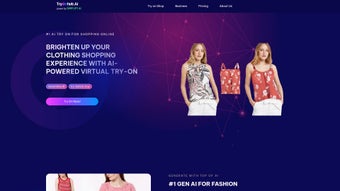

Download TryOnHub – AI virtual try‑on, online shopping, fashion app
Overview & Core Features
TryOnHub is an AI‑powered web application that rewrites the way shoppers interact with fashion online. By simply uploading a personal photo, users can see how garments from a wide range of brands drape on their own body shape, eliminating the guesswork that traditionally hampers e‑commerce conversion. The platform relies on advanced body‑form recognition trained on a diverse set of model postures, ensuring that the virtual overlay matches real‑world dimensions with impressive accuracy. For businesses, TryOnHub offers a low‑code integration that can be embedded into existing storefronts, delivering a personalized experience without the need for a full‑scale development team. Upcoming updates promise AI‑driven outfit recommendations and interactive customization tools, positioning TryOnHub as a future‑proof solution for both consumers and retailers.
The technology behind TryOnHub combines computer‑vision depth estimation with generative adversarial networks (GANs) to render clothing fabrics, folds, and shadows in a realistic manner. This means that not only the silhouette but also the texture of a silk blouse or the stretch of a denim jacket is faithfully reproduced on the virtual model. The system continuously learns from user feedback, improving fit predictions with each interaction. Moreover, the solution is designed to respect privacy: all image processing happens in a secure cloud environment, and no personal data is stored beyond the active session.
Key Features
- AI‑driven body shape detection from a single user‑uploaded photo.
- Real‑time virtual try‑on for thousands of clothing items across multiple brands.
- Low‑code widget for seamless integration into e‑commerce platforms.
- Future‑ready recommendation engine that suggests complementary outfits.
- Secure cloud processing ensuring user privacy and fast performance.
- Social‑share ready visuals for Instagram, TikTok, and Facebook.
- Responsive design that works on desktop browsers, tablets, and mobile devices.
- Analytics dashboard for retailers to monitor conversion, return rates, and user engagement.
- Multi‑language support and localized size charts for global audiences.
Installation, Usage & Compatibility
Because TryOnHub is a web‑based solution, there is no traditional “install” process like you would find with desktop software. Users simply navigate to the official TryOnHub website, create a free account, and begin the virtual try‑on workflow. The onboarding wizard guides the user through uploading a high‑resolution portrait, selecting a preferred body pose, and calibrating the image with a few quick adjustments. Once the profile is set, the AI engine processes the photo within seconds, generating a 3‑D body model that can be used to overlay any supported garment.
The first step of the wizard asks users to choose a lighting condition that matches their photo—daylight, indoor, or studio—so the AI can correctly interpret shadows and fabric sheen. After the upload, a short “fit calibration” screen appears where users can align eye level, shoulder width, and waist position using draggable guides. This calibration ensures that the virtual garments align perfectly with the user’s anatomy, providing a realistic fit preview.
The platform is built with modern web standards (HTML5, CSS3, and WebGL) and runs efficiently on all major browsers, including Chrome, Firefox, Safari, and Edge. Because the heavy lifting is performed in the cloud, device performance requirements are modest—any computer or mobile device with a stable internet connection can deliver a smooth experience. For businesses, TryOnHub provides an embeddable JavaScript snippet and RESTful API endpoints that work across Windows, macOS, Linux, Android, and iOS environments, making it truly cross‑platform.
Security is baked into the workflow. All uploaded photos are encrypted in transit (TLS 1.3) and stored temporarily for processing only; they are automatically deleted after the session ends, complying with GDPR and CCPA standards. Updates to the AI models and UI improvements are rolled out automatically on the server side, meaning users always have access to the latest features without manual patches.
Compatible Operating Systems: Windows 10/11, macOS 12+, Linux (any modern distro), Android 8+, iOS 13+ (via browser).
Pros, Cons & Frequently Asked Questions
Pros
- Highly accurate virtual try‑on thanks to sophisticated body‑form AI.
- No software download required; works directly in the browser.
- Free tier available for casual shoppers; scalable pricing for enterprises.
- Improves conversion rates for retailers by reducing return rates.
- Future‑ready roadmap with AI recommendations and customization tools.
- Robust analytics give retailers insight into shopper behavior.
- Multi‑language and size‑chart support broadens global reach.
Cons
- Current version relies on user‑uploaded photos; live video try‑on is not yet supported.
- Requires a stable internet connection for real‑time processing.
- Some high‑fashion brands may not yet have API access to their product catalogs.
- Limited offline functionality due to cloud‑centric architecture.
- Initial calibration may feel slightly technical for non‑tech‑savvy users.
FAQ
Is TryOnHub really free to use?
Yes, TryOnHub offers a completely free tier for individual shoppers. Retailers can choose from several paid plans that provide higher API limits, white‑label branding, and advanced analytics.
How secure is my uploaded photo?
All images are encrypted with TLS 1.3 during upload and are stored only for the duration of the session. They are automatically purged after processing, ensuring your privacy.
Can I integrate TryOnHub with my Shopify store?
Absolutely. TryOnHub provides a low‑code JavaScript widget and a REST API that can be embedded into Shopify, WooCommerce, Magento, and other major platforms.
What devices are supported for the best experience?
Any modern desktop or mobile device with a recent browser version works well. For optimal performance, we recommend a device with at least 4 GB of RAM and a broadband connection.
Will TryOnHub ever support live video try‑on?
Live video try‑on is on the product roadmap for Q4 2025. The development team is actively researching low‑latency streaming solutions to bring that capability to users.
How does TryOnHub help retailers reduce returns?
By allowing shoppers to visualise a precise fit before purchase, TryOnHub reduces the likelihood of size‑related dissatisfaction. Retailers report a 15‑30% drop in return rates after implementing the widget.
Conclusion & Call to Action
TryOnHub is reshaping online fashion retail by marrying AI precision with a frictionless browser experience. Shoppers gain confidence before hitting “Buy,” while retailers enjoy higher conversion rates and fewer returns. The platform’s low‑code integration, robust security, and upcoming AI‑driven recommendations make it a compelling choice for anyone looking to modernize the e‑commerce journey. Whether you’re a casual buyer eager to see how that summer dress fits or a brand seeking a scalable virtual fitting solution, TryOnHub delivers the tools you need today and the roadmap for tomorrow.
Ready to eliminate the guesswork from online shopping? Download TryOnHub now and start trying on clothes virtually—securely, instantly, and for free. For businesses, explore the enterprise plan to unlock API access, white‑label customization, and detailed analytics that turn every visit into a conversion opportunity.



.png)



